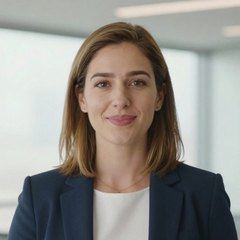




Sarah
Clinical skills“Hand hygiene is the simplest way to protect the people in your care. Let us walk through the five moments together.”
NewAn in-house presenter studio from CAQA
CAQA Avatar turns a script into a video of a presenter saying it. Describe a presenter who does not exist, or use one photo or a short recording of your own people, with their permission. Nothing is uploaded to an outside avatar service and nothing is metered.
“Welcome to your course. Over the next few weeks you will build practical skills you can use from day one.”
1
to make a presenter who can say any script
19
plus your own, from a description, a photo or a recording
0
faces, voices and scripts stay in house
23
in the library, plus your own people
Three ways to make an avatar
Start with whatever you have. A written description needs nobody at all. A photo or a recording brings your own people to the screen.
Describe a presenter who does not exist: age, look, clothes and setting. Four options are drawn and you keep the ones you like.
No permission neededOne clear photo facing the camera is enough. It becomes a presenter who can say any script you write.
Permission recorded firstA short video of a person talking gives the avatar their face and their voice, so it looks and sounds like them.
Permission recorded firstHow a video is made
Four steps, and the studio does the filming.
Pick from the library, or add a new one from a description, a photo or a short recording.
Type or paste the script and choose a voice. Australian library voices and your own people's voices are both available. Or supply a recording of the words.
Wide, tall or square. Natural, warm, explaining with gestures, energetic or serious. Captions on or off.
A finished MP4 with clear sound and a captions file. Not happy with the performance? Ask for another take.
The presenters
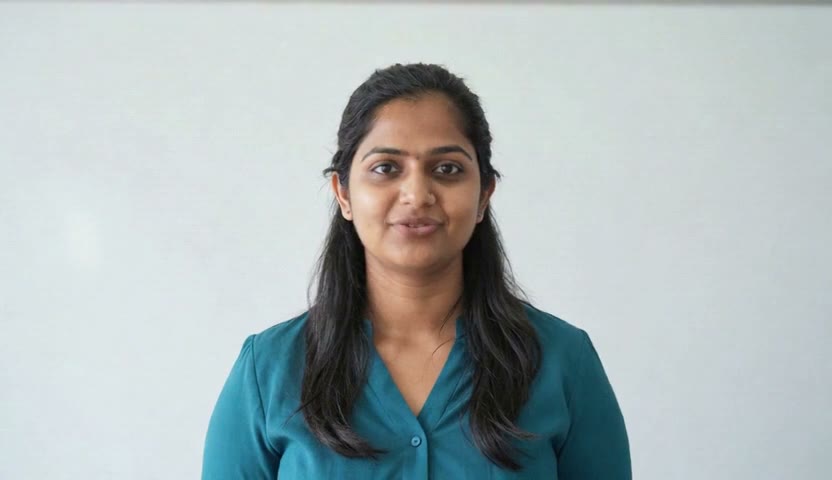
Every clip below is real output from CAQA Avatar, exactly as it was made. Each presenter began as one sentence of description.
“Hand hygiene is the simplest way to protect the people in your care. Let us walk through the five moments together.”
“Good leaders listen first. In this module you will practise giving feedback that people can act on.”
“Welcome to orientation week. Here is everything you need to know before your first class.”
“A clear budget starts with three numbers. What comes in, what goes out, and what is left over.”
“Every customer wants to feel heard. Start by repeating their concern back in your own words.”
“Short on time this week? Try twenty minutes of study a day, and tick off one small task each time.”
“Person centred care begins with a simple question. What matters most to you today?”
“You are further along than you think. Keep going, and ask for help as soon as you need it.”
“A strong password is long, unique and easy for you to remember. Let me show you how to build one.”
Private by design
Cloud avatar services need photos and recordings of your people on their servers. CAQA Avatar does all of its work on computers CAQA owns.
Photos and recordings of your people are kept on CAQA's own computers in Australia. They are not uploaded to an outside avatar service.
Draft assessments, unreleased courses and internal messages are spoken and drawn without leaving our studio.
Every avatar of a real person carries a record of who agreed, how and until when. Withdraw it and the avatar stops working.
Real people, real permission
An avatar can look and sound like one of your trainers. That is only right when they have agreed, and when they can change their mind.
Everything in one studio
Need a presenter today? Describe one. The studio draws photorealistic options of a person who does not exist, ready to speak.
A single photo is enough. The studio finds the face, frames it like a presenter shot and brings it to life.
A short video of someone talking to camera gives the avatar both their look and their voice.
Type the words. The studio speaks them in an Australian library voice or in the voice of one of your own people, then the presenter says them on screen.
The same presenter can deliver a course welcome, a safety briefing or a social clip.
Captions come from the script itself, so the words on screen are the words you wrote.
Copying a real person is a serious thing. The studio treats it that way.
Cloud avatar services need your people's faces on their servers. CAQA Avatar does its work on computers CAQA owns.
Compare
Cloud avatar services are impressive. They also keep your people's faces on their servers, meter every minute and limit how many avatars you may have.
| What matters | In-house studioCAQA Avatar | Cloud avatar servicessuch as HeyGen and Synthesia, on standard plans |
|---|---|---|
| Where photos and recordings of your people go | They stay on CAQA's own computers in Australia | Uploaded to the provider's servers |
| How you are charged | No minute meter and no credits | Monthly plans with minute or credit limits |
| Watermark | None | Added on free plans and trials |
| Length of a video | No fixed cap. Longer scripts simply take longer to draw | Capped per video on most plans |
| Number of your own avatars | As many as you have permission for | A set number per plan |
| Voices | Australian library voices and your own people, with each sentence checked against the script | Large voice libraries in many languages |
Made for training
Open every course with a presenter who greets learners by course name and sets expectations.
A short presenter clip at the start of each topic, in the same voice as the narration.
Site inductions and safety briefings delivered by a consistent, calm presenter.
Your own trainers on screen, with their permission, without booking a camera each time.
Policy changes and student notices as a one minute video instead of a long email.
Tall and square clips for course promotion, made from the same presenters.
Questions
Something else on your mind? Ask us directly or call 1800 266 160.
Yes. One clear photo facing the camera is enough to make a presenter who can say any script. A short video is better still, because it also gives the avatar the person's own voice.
No. Every presenter shown here was made from a written description. They do not exist, which is why no permission was needed to show them.
Only with that person's recorded permission. The studio will not use an avatar of a real person until its permission is on the register, and withdrawing the permission switches the avatar off.
Each presenter is filmed once, which took about 13 minutes for the presenters on this website. After that, each short sample here took about 67 seconds to make. A 30 second video took about 5 minutes, including recording the voice. A fully drawn studio take, with expression that follows every word, takes much longer and is kept for short clips.
A finished MP4 video in the shape you chose, with clear sound, plus caption files. Captions can also be shown on the video itself.
Any voice in the CAQA Voice library, including named Australian voices, or the voice of one of your own people added with their permission.
No. It is a way to deliver consistent introductions, briefings and messages. Training and assessment decisions remain with your trainers and assessors.
Every file notes it in its details. A small visible label can be added to the picture whenever you want one.
Nowhere outside CAQA. Scripts, photos and recordings are processed on CAQA's own computers in Australia and are not sent to an outside avatar service.
Book a 20 minute demo. Bring a paragraph from one of your courses and choose a presenter. We will send you the finished video.